Browse through these FAQs to find answers to commonly asked questions about Loterre.
Loterre (acronym for Linked open terminology resources) is a platform for exposing and sharing multidisciplinary and multilingual scientific terminological resources.
Loterre complies with open and linked data (LOD) web standards and FAIR principles, which aim to make data Findable, Accessible, Interoperable and Reusable.
The terminological resources available in Loterre can meet the needs of text-mining, semantic annotation, information retrieval or translation.
Access to Loterre resources is open to all; their reuse depends on their license.
Loterre gives access to scientific terminological resources and allows to:
browse them,
search them via a search engine, a SPARQL endpoint and an API,
download them in several formats.
Loterre also offers online services, the content of which is detailed in the “Services offered in Loterre” section of this page.
Producers of terminological resources who wish to publish them on the Loterre platform are invited to read the Loterre Charter and submit a request via the contact form.
These principles form a guide to good practice for the management and reuse of data and metadata by both machines and humans. However, they do not constitute a specification because they do not recommend any particular standard, technology or data format.
The terminology (meta)data presented in Loterre meets all the FAIR principles. Indeed, they are:
Findable: concept associated with a unique and persistent identifier (URI)
Accessible: free and open access protocol (http)
Interoperable: language for knowledge sharing and representation (SKOS)
Reusable: clearly defined user license (CC or Etalab)
They can also participate in the FAIRification of (meta)research data by promoting their semantic interoperability (through vocabulary or thesaurus concepts).
Similarly, the Check, Transform and Align Loterre services aim to facilitate the creation and enrichment of terminological resources in SKOS/RDF-XML format according to FAIR practices.
Loterre aims to comply with the principles of LOD (Linked Open Data) as presented in 2006 by W3C (Tim Berners-Lee): terminological resources are considered here as organized sets of concepts (designated by terms) that are freely accessible via semantic web technologies.
Linked Data or “web of linked data” is based on 4 basic rules:
Identify each resource (or concept) by a URI (Uniform Resource Identifier)
Use HTTP URIs (dereferenceable) to access information on these resources
When dereferencing a URI, return to structured data using the W3C family of standards: model (triplets RDF) and languages (SKOS, RDFS, OWL…) to describe them; SPARQL to query them
Link concepts (RDF data) belonging to different terminological resources through alignments via their URIs, in order to create a network of RDF links and thus discover new relationships
By adding open licenses for the distribution and reuse of resources published on the web, Loterre complies with the rules of “Linked Open Data”.
T. Berners-Lee also proposed a progressive classification of LODs with 5 stars according to the following criteria:
* Data freely available on the web, with mention of an open license
** Data in a structured, machine-readable format
*** Non proprietary formats (CSV, JSON, …)
**** W3C open standards (RDF, XML, SPARQL) and URI as resource identifier
***** Data linked to other RDF data via alignments in the LOD Cloud
Finally, the resources integrated into the triplestore are intended, as far as possible, to comply with W3C best practices for the publication of related data (W3C, 2014).
All the resources exposed in Loterre are compatible with these rules and principles and can be classified as 4 or 5 stars:
Free (lo) and/or open (CC BY) license
Standard formats: SKOS, XML, JSON-LD, CSV
Alignable URIs
To cite a Loterre resource, indicate "Loterre," then the long title of the resource followed by its DOI. For example, "Loterre, Open Science Thesaurus, https://dx.doi.org/10.13143/lotr.9297".
If there is no DOI, replace it with the resource's URI; for example, "Loterre, Thematic Geography Vocabulary, http://data.loterre.fr/vocabs/BGI/GT".
Services offered in Loterre
In addition to downloading hosted terminologies, Loterre offers services that might help terminological resource producers, whether or not they wish to publish their resources in Loterre.
The Check, Transform, and Align services aim to facilitate the creation and enrichment of terminological resources in SKOS/RDF-XML format according to the FAIR principles (Findable, Accessible, Interoperable, Reusable).
Note: User data files processed by these services are not saved by Inist-CNRS.
This service aligns (maps) a valid SKOS/RDF-XML file (source) with a Loterre terminological resource (target) specified by the user.
It checks whether a term (preferred or alternative) of a concept A of the source vocabulary is identical to a term (preferred or alternative) of a concept B of the target vocabulary (for the same language code). It processes files containing “skos:Concept” (short form of the RDF/XML syntax) or “rdf:Description[rdf:type[@rdf:resource=’http://www.w3.org/2004/02/skos/core#Concept’]]”.
Note that alignment is based on a comparison of strings, which must be identical on both sides, without taking into account the context; the alignments will therefore have to be validated by the user.
Two variants of this service are available:
“Align a valid SKOS/RDF-XML file with a terminological resource hosted in Loterre by inserting the property ‘skos:exactMatch’ in the source file”:
if a term (preferred or alternative) of a concept A of the source vocabulary is identical to the preferred or alternative of a concept B of the target vocabulary, a “skos:exactMatch” property is inserted in the concept A with the URI of the target concept in the attribute “rdf:resource”.
“Align a valid SKOS/RDF-XML file with a Loterre vocabulary by producing an alignment file”:
if a term (preferred or alternative) of a concept A of the source vocabulary is identical to the preferred or alternative of a concept B of the target vocabulary, a new file is created (RDF-XML format) and then for each alignment :
a “rdf:Description” record is created,
the URI of the source concept is set in the “rdf:about” attribute of this record,
a “skos:exactMatch” property is created in this record,
the URI of the target concept is set in the “rdf:resource” attribute of this property.
The records in the alignment file can be added as they are at the beginning or end of the source file.
The “Annotate” service allows a user to search, in a portion of text written in French, English or Spanish, for the presence of terms (preferred or alternative labels) from a terminological resource hosted in Loterre.
It displays the text in which the detected terms have been highlighted and a table of corresponding terms and concepts, with their URI.
This service permits an online check of a SKOS-XML file validity.
It allows three types of checks to be performed: collections validity, concepts validity, concept scheme validity.
Check of collection validity
The service Controlling a SKOS/RDF-XML file at the collections level processes files containing “skos:Collection” or “isothes:ConceptGroup” or “rdf:Description[rdf:type[@rdf:resource=’http://www.w3.org/2004/02/skos/core#Collection’]]” or “rdf:Description[rdf:type[@rdf:resource=’http://purl.org/iso25964/skos-thes#ConceptGroup’]]”.
It performs a preliminary analysis of the resource to determine:
the number of “Collection” blocks;
the nature and number of elements (properties) that compose them.
It then performs the checks and returns the results in the form of a table detailing the types of anomalies detected.
List of checks carried out:
Code
Anomaly description
Col-0
The resource contains neither skos:Collection, nor isothes:ConceptGroup, nor rdf:Description[rdf:type[@rdf:resource=’http://www.w3.org/2004/02/skos/core#Collection’]] or “rdf:Description[rdf:type[@rdf:resource=’http://purl.org/iso25964/skos-thes#ConceptGroup’]]” element.
Col-@0
Missing URI identifier. A collection has no identifier.
Col-@N
Unauthorized attribute. Only the “rdf:about” attribute is authorized for “skos:Collection” or rdf:Description[rdf:type[@rdf:resource=’http://www.w3.org/2004/02/skos/core#Collection’]] or “rdf:Description[rdf:type[@rdf:resource=’http://purl.org/iso25964/skos-thes#ConceptGroup’]]” element.
Col-2
Anomaly of structuration of collections. Despite the presence of an “isothes:superGroup” property in collections, no “isothes:subGroup” property was found in the corresponding super-collection. The menu “Insert narrower collections in a valid SKOS/RDF-XML file” can be used to fix the problem.
Col-3
Inconsistency at the resource identifier level. The value of “rdf:resource” attribute on “skos:inScheme” element of a collection is different from the resource identifier (ConceptScheme).
Col-4
Non-existent member. A member of a collection is not a concept of the resource. Create the corresponding concept or delete this member.
Col-5
Collection identifier contains an unauthorized character (white space, apostrophe, double quotation mark, left bracket, right bracket).
Check of concept validity
The service Controlling a SKOS/RDF-XML file at the concept level processes files containing “skos:Concept” or “rdf:Description[rdf:type[@rdf:resource=’http://www.w3.org/2004/02/skos/core#Concept’]]”.
It performs a preliminary analysis of the resource to determine:
the number of “skos:ConceptScheme”, “skos:Concept”, “skos:Collection” and “skosxl:Label” blocks;
the nature and number of elements (properties) that compose them;
the languages of the resource.
It then performs the checks and returns the results in the form of a table detailing the types of anomalies detected.
List of checks carried out:
Code
Anomaly description
D-Id
Uniqueness of the identifier (URI) of a given concept. Two different concepts can’t have the same identifier.
E-0
Presence of an empty field (property). May interfere with the continuation of the control program. Can also prevent import into some terminology editors.
@-0
Presence of an empty attribute.
R-A1
Clash between semantic relations: the same concept is a related concept and a broader concept (direct or indirect) of the current concept. Cf. SKOS Reference (S27 Integrity Condition).
R-FX1
Reflexive hierarchical relation: a concept is its own broader concept.
R-FX2
Reflexive associative relation: a concept is its own related concept.
R-31
Clash between associative and hierarchical relations: if concept A has concept B as a narrower concept and concept C as a related concept, then C can not be a narrower concept of B because concept C can not be linked simultaneously to concept A by two disjoint relationships “skos:narrowerTransitive” and “skos:related”. See details in SKOS-Primer and SKOS Reference.
R-32
Clash between associative and hierarchical relations: if concept A has concept B as a broader concept and concept C as a related concept, then C can not be a broader concept of B because concept C can not be linked simultaneously to concept A by two disjoint relationships “skos:broaderTransitive” and “skos:related”. See details in SKOS-Primer.
R-B3
Cycle between semantic relations: the same concept is a narrower concept and a broader concept of the current concept.
R-A2
Clash between semantic relations: the same concept is a related concept and a narrower concept of the current concept. See SKOS Reference (S27 Integrity Condition).
R-NS
Non-symmetric associative link (skos:related). See SKOS Reference (Axiom S23); see Symmetry correction
R-0
Relation (skos:related, skos:broader or skos:narrower) that targets a non-existent concept.
R-OR
Orphan concept: a concept that is not a top-concept, and which has neither broader nor narrower concepts.
CS-0
Concept not linked to the concept scheme through “skos:inScheme” element.
CS-3
Inconsistency at the level of the resource identifier (URI). The value of “rdf:resource” attribute in “skos:inScheme” element is different from the resource identifier.
LP-0
Missing preferred label for one of the resource languages.
LP-N1
More than one value preferred label per language tag. See SKOS Reference (S14 Integrity Condition)
LP-LA1
Preferred label / alternative label duplicate within the same concept. See SKOS Reference (S13 Integrity Condition)
LP-LC1
Preferred label / hidden label duplicate within the same concept. See SKOS Reference (S13 Integrity Condition)
LP-LP2
Same preferred label for two different concepts.
LP-LA2
Preferred label / alternative label duplicate between two different concepts.
LP-LC2
Preferred label / hidden label duplicate between two different concepts.
LA-LA1
Alternative label duplicate within the same concept.
LA-LA2
Same alternative label for two different concepts.
LA-LC1
Alternative label / hidden label duplicate within the same concept. See SKOS Reference (S13 Integrity Condition)
LA-LC2
Alternative label / hidden label duplicate between two different concepts.
LC-LC1
Hidden label duplicate within the same concept.
LC-LC2
Same hidden label for two different concepts.
Check of the concept scheme validity
The service Controlling a SKOS/RDF-XML file at the concept scheme level processes files containing “skos:ConceptScheme” or “rdf:Description[rdf:type[@rdf:resource=’http://www.w3.org/2004/02/skos/core#ConceptScheme’]]”.
It performs a preliminary analysis of the resource to determine:
the number of “ConceptScheme” blocks;
the nature and number of elements (properties) that compose them.
It then performs the checks and returns the results in the form of a table detailing the types of anomalies detected.
List of checks carried out:
Code
Anomaly description
CS-N
Missing ConceptScheme element. The file contains neither a skos:ConceptScheme element nor a rdf:Description[rdf:type[@rdf:resource=’http://www.w3.org/2004/02/skos/core#ConceptScheme’]] element. The menu Insert a skos:ConceptScheme can be used to fix the problem.
CS-0
Missing concept scheme identifier (URI).
CS-1
Unauthorized attribute in ConceptScheme element. Only rdf:about attribute is authorized.
CS-2
Missing skos:hasTopConcept properties. Despite a great structuration of the resource ConceptScheme element lacks skos:hasTopConcept properties to list top-concepts . The menu “Insert hasTopConcept properties” can be used to fix the problem.
CS-3
Inconsistency at the level of the resource identifier (URI). The value of rdf:resource attribute in skos:inScheme element of a given concept is different from the resource identifier.
This service enables to transform a CSV file into SKOS-XML format, to fix anomalies of SKOS-XML files, or to convert a file initially in SKOS-XML format into other formats.
The modules offered by this service can be grouped into three types: correction, enrichment and conversion.
Correction
These modules are in particular intended to correct anomalies previously detected by the “Check” service.
Remove term duplicates in a SKOS/RDF-XML file
Files containing “skos:Concept” or “rdf:Description[rdf:type[@rdf:resource=’http://www.w3.org/2004/02/skos/core#Concept’]]” are processed by this service.
At the level of each concept, this service operates as follows:
All the preferred labels are kept, provided that only one is used per language:
If, for the same language, two identical preferred labels are present, only one is kept.
If, for the same language, two different preferred labels are present, the first is kept, the other is set to "skos:altLabel".
Alternative labels are compared with each other and with the preferred label of the same language:
if the same term appears several times as an alternative label of the same language, only one occurrence is kept;
if the same term appears both as an alternative label and the preferred label of the same language, only the preferred label is kept.
Hidden labels are compared with each other, with the preferred label, and with alternative labels of the same language:
if the same term appears several times as a hidden label of the same language, only one occurrence is kept;
if the same term appears both as a hidden label and the preferred label of the same language, only the preferred label is kept;
if the same term appears both as a hidden label and an alternative label of the same language, only the alternative label is kept.
At the end of this process, check the file again using the Controlling a SKOS/RDF-XML file at the concept level service to ensure that there are no more duplicates.
Correction of symmetry anomalies of related concepts in a SKOS/RDF-XML file
Files containing “skos:Concept” or “rdf:Description[rdf:type[@rdf:resource=’http://www.w3.org/2004/02/skos/core#Concept’]]” are processed by this service.
If a concept A is associated to a concept B through the skos:related property, the concept B must be associated with the concept A because the relation is symmetrical. Cf. SKOS Reference (Axiom S23).
If this condition is not checked, this service allows inserting the missing “skos:related” property.
Note that this treatment does not apply to any custom sub-properties of the “skos:related” property.
Inserting narrower concepts
The hierarchical relationship between two concepts is expressed using the "skos:broader" property, and the presence of a "skos:narrower" relationship (which is its inverse) at the target concept is not mandatory because it is inferred from the "skos:broader" relationship.
However, some applications (such as Skosmos) require the presence of both relationships.
The "Insert specific concepts into a valid SKOS/RDF-XML file" service processes files containing "skos:Concept" or "rdf:Description[rdf:type[@rdf:resource='http://www.w3.org/2004/02/skos/core#Concept']]" elements.
It inserts into the SKOS file, at the level of each broader concept, as many "skos:narrower" properties as there are narrower concepts of this concept.
Insertion of narrower collections
Files containing “skos:Collection” or “rdf:Description[rdf:type[@rdf:resource=’http://www.w3.org/2004/02/skos/core#Collection’]]” or “rdf:Description[rdf:type[@rdf:resource=’http://purl.org/iso25964/skos-thes#ConceptGroup’]]” are processed by this service.
The hierarchical relationship between a collection A and a collection B is expressed using the “isothes:superGroup” property. The presence of an “isothes:subGroup” property (which is the inverse relationship) at the level of collection B is not mandatory because it is inferred from the “isothes:superGroup” property.
However, the proper functioning of some applications (like Skosmos) requires the presence of both relationships. This service allows to insert at the level of the broader collection as many “isothes:subGroup” properties as narrower collections of this collection.
Enrichment
Insertion of a ‘ConceptScheme’ class and a license in a SKOS/RDF-XML file
Files containing “skos:Concept” or “rdf:Description[rdf:type[@rdf:resource=’http://www.w3.org/2004/02/skos/core#Concept’]]” are processed by this service.
This service inserts two classes at the beginning of a SKOS/RDF-XML file:
a “cc:License” class with the default CC-BY 4.0 Creative Commons license that should be changed if the resource is released under a different license.
a “skos:ConceptScheme” or “rdf:Description[rdf:type[@rdf:resource=’http://www.w3.org/2004/02/skos/core#ConceptScheme’]]” class with:
an URI derived from concept identifiers;
properties for metadata to be completed / modified by the user at the output file level:
English, French and Spanish titles (dc:title),
English, French and Spanish descriptions (dc:description),
English, French and Spanish subjects (dc:subject),
creator name (dc:creator),
license name (cc:license),
English, French and Spanish names of organization / institution to which the resource must be attributed (cc:attributionName),
web site of organization / institution to which the resource must be attributed (cc:attributionURL),
top-concepts (skos:hasTopConcept) if the resource is highly structured,
resource languages as calculated from language tags of preferred labels of concepts (dcterms:language with lexvo/ISO 639-3 code attribute),
creation date (dcterms:created),
last modification date (dcterms:modified),
version (owl:versionInfo).
After the fields have been generated, their textual content must be completed and validated by the user.
Insertion of a ‘hasTopConcept’ property
Files containing “skos:ConceptScheme” or “rdf:Description[rdf:type[@rdf:resource=’http://www.w3.org/2004/02/skos/core#ConceptScheme’]]” are processed by this service.
This service inserts a “skos:hasTopConcept” property into the “ConceptSCheme” block for each concept that does not have a “skos:broader” property.
Do not use this service for unstructured or loosely structured resources.
Insertion of a ‘topConceptOf’ property
Files containing “skos:Concept” or “rdf:Description[rdf:type[@rdf:resource=’http://www.w3.org/2004/02/skos/core#Concept’]]” are processed by this service.
This service inserts a “skos:topConceptOf” property into each concept that does not have a “skos:broader” property.
Do not use this service for unstructured or loosely structured resources.
Assignation of ARK identifiers
Files containing “skos:Concept” or “rdf:Description[rdf:type[@rdf:resource=’http://www.w3.org/2004/02/skos/core#Concept’]]” are processed by this service.
This service allows the replacement of the identifiers (URI) of a SKOS/RDF-XML file by ARK identifiers built according to the recommendations of the California Digital Library (CDL).
An ARK identifier has the following syntax:
The NMA (Name Adressing Authority), its role is to make the URL clickable in a web browser,
The actual ARK identifier which consists of:
the “ark:/” label,
a NAAN (Name Assigning Authority Number) identifying the naming organization which is attributed on demand by the CDL.
The transformation is performed in two stages:
1- Replacement of the resource URI (at the level of the concept scheme) by the following generic URI: http://my_site.fr/ark:/NAAN/ABC. The old URI is kept in a “dc:identifier” field.
At the concept level, an 8-character alphanumeric sequence followed by a dash and then a “check sum” completes this prefix and constitutes a unique ARK identifier for each concept of the resource.
Prefix
Unique identifier
http://my_site.fr/ark:/NAAN/ABC
-CGT6ZZBQ-F
2- URI recalculation for:
each of the “skos:broader”, “skos:narrower”, “skos:related” relations,
the possible “skosxl:prefLabel”, “skosxl:altLabel”, “skosxl:hiddenLabel” properties,
the members of possible collections,
the possible “skosxl:Label” elements.
To generate ARK identifiers that comply with CDL recommendations (see details here), the generic URI must be replaced as follows:
Replace the sequence “http://my_site.fr” (Adressing Authority) by the good URL,
Keep the “/ark:/” label,
Replace “NAAN” (Name Assigning Authority Number) by organization NAAN,
Replace “ABC” by an alphanumeric short code corresponding to the resource itself.
Here is a real example: http://data.loterre.fr/ark:/67375/1WB
Note that in the absence of NAAN, the URI can not be considered an ARK identifier but can nevertheless be used without the ark:/NAAN/ part, the last part being a unique identifier.
Conversion
Loterre offers various conversion modules.
Transform a CSV file into a SKOS/RDF-XML file
This transformation allows to generate a SKOS-XML file from a spreadsheet (Excel, OpenOffice, etc.) saved as CSV.
Loterre offers two variants of this service, depending on whether the field separator in the CSV file is a semicolon or a comma:
Transform a CSV file whose separator is a semicolon into a SKOS/RDF-XML file
Transform a CSV file whose separator is a comma into a SKOS/RDF-XML file
n.b.: with a CSV file whose separator is a semicolon use double quotation marks (” / quote) as text delimiter for fields that contain semicolons as ponctuation signs. Add quotation marks around such fields to avoid splitting of text at semicolon. If text contains quotes, they must be doubled.
The input file must:
use this separator «§§» for multi-valued fields (example: hormone§§drug),
use the following labels for the different fields:
Terminological data
Label to use
xx = 2 digit ISO code for language (*)
Comment
Preferred label
prefLabel_xx
A “preflabel_en” is expected
Alternative label
altLabel_xx
Hidden label
hiddenLabel_xx
Definition
definition_xx
Note
note_xx
Scope note
scopeNote_xx
Editorial note
editorialNote_xx
History note
historyNote_xx
Change note
changeNote_xx
Example
example_xx
Broader term
broader_xx
A “broader_en” is expected
Related term
related_xx
A “related_en” is expected
Group (collection)
group_xx
A “group_en” is expected
Exact match
exactMatch
Close match
closeMatch
Broad match
broadMatch
Narrow match
narrowMatch
Related match
relatedMatch
(*) Replace “xx” by 2 digit ISO code for language; example “prefLabel_en” for the English preferred label. See list of ISO 639-1 codes.
The data is transformed as follows:
A SKOS/RDF-XML file is created to hold the entire terminological resource.
Each line except the first one becomes a “skos:Concept”, if an identifier is present, it is attributed to the concept; otherwise, a temporary URI is assigned to it in the “rdf:about” attribute.
The labels in the first line are converted to their SKOS counterpart, for example, prefLabel_en becomes “skos:prefLabel” with an attribute “xml:lang=”en””.
The content of each cell is put into the appropriate SKOS property. If the content is multi-valued, it is split into as many properties as values separated by the separator “§§”.
The related and broader relationships are processed in two stages: firstly, a “skos:related” or “skos:broader” property is generated for each related or broader term then in a second step, it is the URI of the concept corresponding to the terms in question which is put in the attribute “rdf:resource” .
If the file has groups, a “skos:Collection” is created for each group.
In addition, the transformation also inserts two blocks at the beginning of the SKOS/RDF-XML file:
a “cc:License” block with the default Creative Commons CC-BY 4.0 license that should be changed if the resource is released under a different license.
a “skos:ConceptScheme” block with:
an URI derived from concept identifiers;
properties for metadata to be completed / modified by the user at the output file level:
English, French and Spanish titles (dc:title),
English, French and Spanish descriptions (dc:description),
English, French and Spanish subjects (dc:subject),
creator name (dc:creator),
license name (cc:license),
English, French and Spanish names of organization / institution to which the resource must be attributed (cc:attributionName),
web site of organization / institution to which the resource must be attributed (cc:attributionURL),
top-concepts (skos:hasTopConcept) if the resource is highly structured,
resource languages as calculated from language tags of preferred labels of concepts (dcterms:language with lexvo/ISO 639-3 code attribute),
creation date (dcterms:created),
last modification date (dcterms:modified),
version (owl:versionInfo).
If the concepts do not have identifiers, the default URI of the resource is “http: //www.mysite/vocabs/ABC”. It is also the root of the URI of concepts, relationships and possible collections. It must be replaced as follows:
Replace “http://www.mysite/” by the correct URL.
Keep “/vocabs/”.
Replace “ABC” by a short alphanumerical code that will identify the resource.
At the concept level, the URI is a concatenation of the resource’s URI with a unique identifier; at the collection level, the URI is a concatenation of the resource’s URI with the group name by replacing the spaces with “_”.
To switch to ARK identifiers, use the transformation “Assign ARK identifiers to a valid SKOS/RDF-XML file”.
Transform a SKOS/RDF-XML file to a CSV file
Files containing “skos:Concept” or “rdf:Description[rdf:type[@rdf:resource=’http://www.w3.org/2004/02/skos/core#Concept’]]” are processed by this service.
Loterre offers two variants of this service, depending on the field separator desired in the resulting CSV file:
“Transform a SKOS/RDF-XML file to a semicolon-separated CSV file”
“Transform a SKOS/RDF-XML file to a comma-separated CSV file”
The output file can be imported into a spreadsheet (Excel, LibreOffice, etc.) for editing (see the import procedure in Excel below).
The data are transformed as follows:
A first row “column headers” is created from the elements (skos or other properties) used to describe the different concepts of the SKOS/RDF-XML file:
An “ID” tag is created for concept identifiers.
Properties with an “xml:lang” attribute are listed by concatenating the element name (without namespace) with the language code (for example, “skos:prefLabel/@xml:lang=”en'” gives the label “prefLabel_en”).
For properties that have an attribute other than “xml:lang”:
those corresponding to the semantic relations (“skos:broader”, “skos:narrower” and “skos:related”) are translated into “broader_en”, “narrower_en” and “related_en”,
the others (mapping properties, etc.) are output with the name of the element only (without namespace, for example,”exactMatch” for “skos:exactMatch”).
Properties that have no attributes are output with the element name only (without namespace).
If the file contains collections, a “group_en” label is created. This label can be redundant if the concepts contain properties reflecting their belonging to groups (domain, microthesaurus, etc.).
Then, a line is generated for each concept of the file:
the value of the “rdf:about” attribute is put in the “ID” column,
the content of the textual elements (terms, definitions, notes, etc.) is put in the column corresponding to that element and to the language code of that element,
hierarchical and associative relations (links) are replaced by the corresponding English preferred terms,
the content of the other elements is output as is,
if the concept belongs to a collection, the English name of the collection is put in the “group_en” column.
It should be noted that:
the contents of the different fields are put between quotes (quotation marks) to avoid the problems of separation when these contents contain the semicolon as element of punctuation,
if the content of a field contains quotes, they are doubled to protect them,
the contents of multiple-occurrence fields (for example, “skos:altLabel”) are dropped into the same “cell” but separated by this separator “§§”.
To import a CSV file to Excel:
Create a new file in Excel (“File” / “New”).
Click on “Data” menu, choose “From Text” and then choose the file to import.
Import the file (“Import” button).
At the Text Importation Wizard:
choose “Delimited”,
at the “File origin” menu, choose “65001 : Unicode (UTF-8)”
Click the “Next” button:
At the “Delimiters” column, select “Semicolon”,
Keep quotes (") as “Text qualifier”,
Check the imported data with the “Data Preview”,
Click the “Finish” button.
The file modified in Excel and saved as CSV file can be transformed into SKOS using the service “Transform a semicolon-separated CSV file into a SKOS/RDF-XML file” or “Transform a comma-separated CSV file into a SKOS/RDF-XML file” depending on the type of separator used while saving the CSV file.
Transform a SKOS-XML into a HTML file
This transformation allows to generate an HTML file from a valid SKOS file. It processes files containing “skos:Concept” or “rdf:Description” of type “Concept”.
Two variants are proposed by Loterre, depending on the language version chosen:
Convert a valid SKOS/RDF-XML file into an html file – French version
Convert a valid SKOS/RDF-XML file into an html file – English version
The terminology entries are presented in the alphabetical order of preference (French or English):
the terms (preferred and synonyms) in the chosen language
definitions and notes in the chosen language
relationships (generic, associated and specific terms)
preferential terms in other languages
possible membership groups
alignments
any bibliographical references
the source(s) of the concept
The richness of the information displayed will depend on the content and structuring of the original SKOS file.
Transform a SKOS-XML into a PDF file
This transformation generates a PDF file from a valid SKOS file.
Two variants are proposed by Loterre, depending on the language version chosen for the resource:
Transform a SKOS/RDF-XML file into a PDF file corresponding to the French version of the resource
Transform a SKOS/RDF-XML file into a PDF file corresponding to the English version of the resource
Several sections are produced depending on the content and structure of the file:
Alphabetical index
Detailed terminology entries (in French or English) with:
terms, definitions, notes
relationships (generic, associated and specific terms)
preferred terms in other languages
potential membership groups
alignments
any bibliographical references
the source(s) of the concept
The list of entries with:
the French preferential
the English preferential
the page
The tree structure if the resource is structured.
Collections if the resource contains groups.
Additional pages are inserted:
simple cover page with the title of the resource (French or English)
cover page with:
title (French or English) of the resource
version
last update date
description (French or English)
legend for detailed entries
CC-BY 4.0 license plus logo
4th cover with:
title (French or English) of the resource
description (French or English)
Note that the cover pages can be replaced by editing the final file with a PDF editor.
The “Download” service will allow the user to download the full content of one of the resources stored in the Loterre triplestore, in a PDF, CSV, SKOS/XML or JSON-LD format.
Loterre Explorer uses the open source tool LODEX to present an analytical view of the terminology resources exposed in Loterre. It also allows you to explore and sort Loterre terminologies by domain, language, license, producer, etc., by clicking on the "Search" or "Graphics" icons.
In addition to a terminology search in Loterre, "Vocabs Explorer" offers a selection of resources accessible online: terminology repositories or directories, controlled vocabularies, glossaries, lexicons, dictionaries, ontologies, thesauri, etc.
Using the open source tool LODEX, this selection can be explored and sorted by content type, scientific fields, themes, languages, producers, etc., by clicking on the "Search" or "Graphics" icons.
Loterre terminologies
Terminologies submitted by third parties are subject to review based on quality and format criteria. The owners of the Loterre site reserve the right to moderate the proposals received. They may refuse to integrate a terminology if they consider that it does not meet the criteria governing the platform.
The scientific coverage of the terminological resources presented in Loterre is multidisciplinary and must fall within one or more of the following scientific fields:
Sciences and technology
Mathematics
Algebra
Mathematical analysis
Numerical analysis, scientific computation
Combinatorics, ordered structures
Geometry
Probability and statistics
Dynamic systems, global analysis and analysis on manifolds
Group theory
Topology, manifolds and cell complexes
Physics
Acoustics
Crystallography
Electromagnetism, optics
Solid mechanics, fluid dynamics, rheology
Metrology
Atomic and molecular physics
Condensed-matter physics
Physics of gases and plasmas
Nuclear physics
Classical physics, quantum physics, statistical physics, relativity and gravitation
Thermodynamics, heat transfer
Earth and universe sciences
Aeronomy, meteorology, climatology
Astronomy
Geology, internal geophysics
Glaciology
Oceanography
Chemistry
Analytical chemistry
Theoretical chemistry, general chemistry and physical chemistry
Inorganic chemistry
Organic chemistry
Engineering
Aeronautics, transportation
Operational research, control theory
Electronics, computer sciences
Energy, electrical engineering, electrical power engineering
Chemical engineering, chemical and parachemical industry
Civil engineering, buildings and public works
Mechanical engineering
Metallurgy
Polymer industry, paints, wood
Telecommunication, signal theory and processing
Nanosciences, nanotechnology
Life sciences, environmental sciences
Biology, health
Molecular and structural biology, biochemistry
Genetics, genomics, bioinformatics
Animal cellular and developmental biology, zoology, veterinary sciences
Physiology, pathophysiology, systemic medical biology
Neurobiology
Immunology, microbiology, virology, parasitology
Epidemiology, public health, clinical research, biomedical technologies, pharmacology, toxicology, medical sciences
Environmental sciences
Plant cellular and developmental biology, botany
Evolution, ecology, population biology
Biotechnologies, environmental sciences, synthetic biology, agronomy, forestry, food industry
Humanities and social sciences
Markets and organisations
Economy
Finance, management
Standards, institutions and social behaviour
Law
Political sciences
Anthropology and ethnology
Sociology, demography
Information and communication sciences
Space, environment and society
Geography
Land and urban planning
Architecture
Human spirit, language, education
Linguistics
Psychology
Educational sciences
Science and technology in physical activities and sport
Languages, texts, arts and cultures
Ancient and french languages and literature, comparative literature
Foreign literatures and languages, civilisations, regional cultures and languages
Arts
Philosophy, religion sciences, theology
Ancient and contemporary worlds
History
History of art
Archeology
The resources exposed in Loterre must have a license authorizing the availability and reuse of data, such as:
monolingual, provided the language is French or English;
multilingual, provided that one of the languages is either French or English.
It is aimed, wherever possible, that the resources integrated into the triplestore conform to good practices of the W3C relative to the publication of linked data.
Data freely accessible on the web (with the mention of an open licence);
Data in a structured format (readable by the machine);
No-ownership format (CSV, RDF, etc.);
W3C and URI standards to identify each resource;
Data linked to other RDF data via alignments.
Schematically, the terminological resources exposed on Loterre can be of the type:
Vocabulary in the wider sense of the term: glossary, list of terms, thesaurus;
Taxonomies (classification schemes and similar).
Data such as lexical resources, content analysis resources or ontologies can only be integrated into Loterre if they are converted into SKOS format, which may result in a loss of information compared to the original content.
The resources may:
Present a hierarchy: simple, multiple, or none;
Include groupings (collections, groups, fields, facets).
Loterre conception
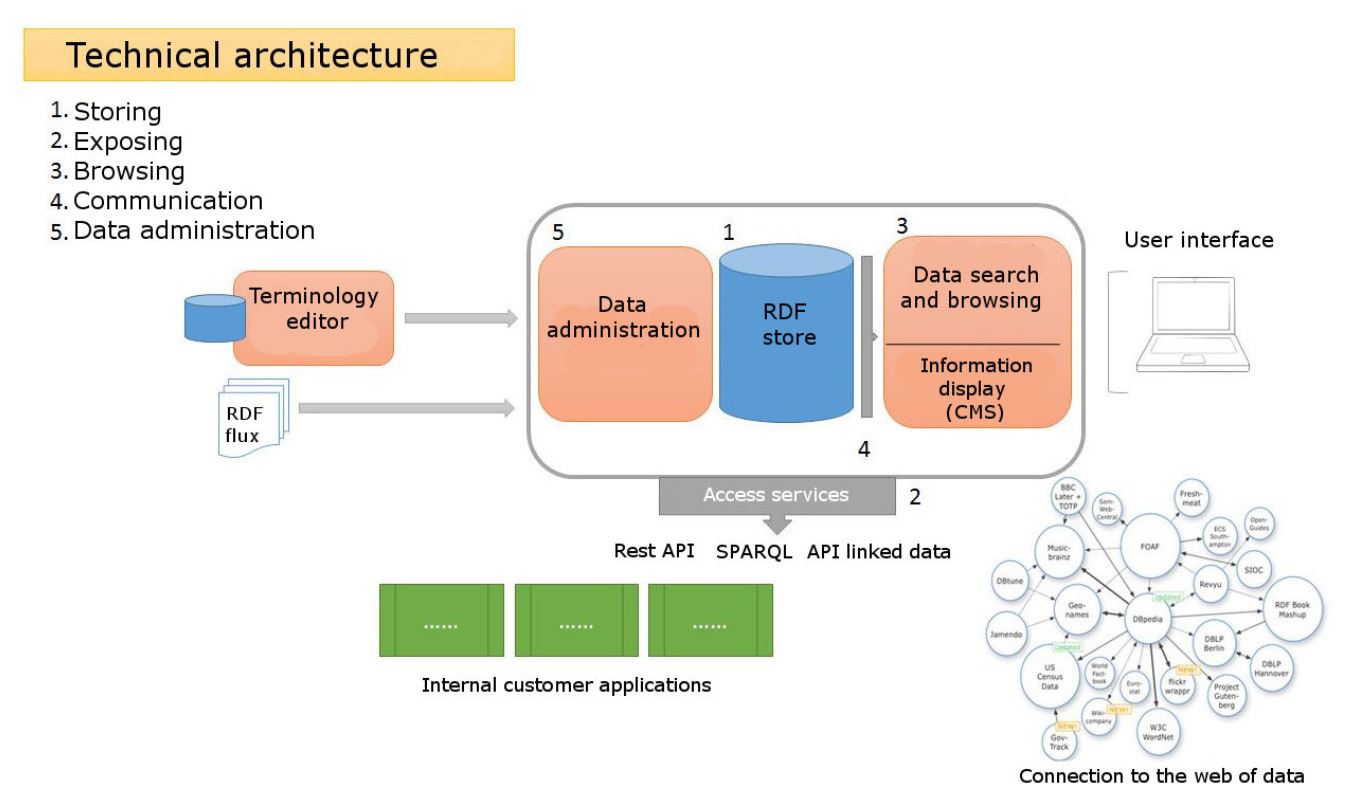
The architecture of Loterre is based on a triplestore connected with a browsing tool and searchable via a SPARQL interface and an API.
To provide access to terminological resources, Loterre uses various open-source third-party tools:
Do you have a question that remains unanswered? Ask it directly using the contact form.
Data model
Click on the questions below to learn more about Loterre
The terminologies integrated into the triplestore are expressed according to an "extended SKOS" type model, which associates with the SKOS standard a certain number of classes and properties belonging to other vocabularies (non-exhaustive list):
This property allows the linkage of two different pieces of software such that one directly executes or uses the other. The has_part relationship should instead be used to describe related but independent members of a larger software package, and 'uses platform' relationship should be used to describe which operating system(s) a particular piece of software can use.
is implemented by is the relationship between an algorithm and a piece of software which includes an implementation of that software for use when the software is executed.
Entity A is 'directly preceded by' entity B if there are no intermediate entities temporally between the two entities. WIthin SWO this property is mainly used to describe versions of entities such as software.
'directly followed by' is an object property which further specializes the parent 'followed by' property. In the assertion 'C directly followed by C1', says that Cs generally are immediately followed by C1s.
'uses platform' should be used to link a particular piece of software to one or more operating systems which that software can run on. This is in contrast to both 'uses software' (which describes one piece of software directly executing another), and has_part, which can be used to describe related but independent software in a package, for example.
Provides a method of asserting what type of interactions are possible for the class in question. The interface must be from the 'software interface' hierarchy.
is executed in defines the relationship between a software class and an appropriate process in the information processing hierarchy. Specifically, it allows the linking of a particular piece of software to a process of a particular purpose,
Axioms using the 'has clause' property, e.g. C 'has clause' C1, provide links from the left hand class to the instances within the 'license clause' hierarchy. This provides a way to more precisely assert the constraints of the licensing applied.
The relationship between an entity and the set of legal restrictions, i.e. license, which are applied in using or otherwise interacting with that entity. Eg. relationship between a software license and the software which implements it.
With both a domain and range of 'data format specification', this property provides a means of stating that two different data format specifications are valid specifications for the same type of data.
The relationship between an entity and the set of legal restrictions, i.e. license, which are applied in using or otherwise interacting with that entity. Eg. relationship between software and a software license.
'is compatible license of' provides a method of marking two software licenses as compatible and without conflicts, e.g. that the Apache License version 2 is compatible with GNU GPL version 3. If two licenses are connected with this property, it means code released under one license can be released with code from the other license in a larger program.
'has declared status' provides a way to assert the developmental status of a class, such as whether it is stable or under development. Is especially useful for software that might not be complete or stable yet, and when combined with version information.
A related resource that references, cites, or otherwise points to the described resource. [This property is intended to be used with non-literal values. This property is an inverse property of References.]
Nomenclature of Territorial Units for Statistics or NUTS (French: Nomenclature des unités territoriales statistiques) is a geocode standard for referencing the administrative divisions of countries for statistical purposes. (source: Wikipedia)
Corresponds to a group of terminology entries (concepts). This class can be replaced by the "isothes:ConceptGroup" class or by the "rdf:Description" class by specifying the type "http://www.w3.org/2004/02/skos/core#Collection" or "http://purl.org/iso25964/skos-thes#ConceptGroup" in the "rdf:resource" attribute of an "rdf:type" tag.
Corresponds to a terminological entry. This class can be replaced by the "rdf:Description" class by specifying the type "http://www.w3.org/2004/02/skos/core#Concept" in the "rdf:resource" attribute of an "rdf:type" tag.
Corresponds to a group of terminological entries (concepts). This class can be replaced by the "skos:Collection" class or by the "rdf:Description" class by specifying the type "http://www.w3.org/2004/02/skos/core#Collection" or "http://purl.org/iso25964/skos-thes#ConceptGroup" in the "rdf:resource" attribute of an "rdf:type" tag.
Corresponds to a bibliographic reference related to a concept (or collection of concepts). Do not confuse with the "dct:bibliographicCitation" property used within this class.
Corresponds to the terminological resource (vocabulary) level to which the terminological entries (concepts) are attached. This class can be replaced by the "rdf:Description" class by specifying the type "http://www.w3.org/2004/02/skos/core#ConceptScheme" in the "rdf:resource" attribute of an "rdf:type" tag.
Information, tools or services useful for publishing terminological resources in the data web
Click on the items below to fold/unfold them
RDF
RDF (Resource Description Framework) is a graph model designed to formally describe web resources and their metadata, enabling automatic processing of these descriptions. Developed by the W3C, RDF is the core language of the Semantic Web. One of the syntaxes (or serializations) of this language is RDF/XML. Other RDF syntaxes have since emerged, seeking to make reading easier; this is the case, for example, with Notation3 (or N3). (Source: Wikipédia)
SKOS
The SKOS format, or "Simple Knowledge Organization System," is a shared data model that enables the exchange and connection of knowledge organization systems on the Web of Data.
The URI is one of the basic building blocks of the web of data in that each resource is uniquely and persistently identified by a URI.
A large number of Loterre resources use URIs of the type Ark, constructed according to the recommendations of the CDL (California Digital Library).
An ARK identifier has the following syntax:
The NMA (Name Addressing Authority) is responsible for making the URL clickable in a web browser.
The ARK identifier itself, which consists of:
the label (scheme) "ark:/",
a numeric code corresponding to the NAAN (Name Assigning Authority Number) assigned upon request by the CDL to organizations producing documentary resources.
an alphanumeric string assigned to each concept and terminated by a checksum character.
A tool for representing resources in SKOS format, which allows you to display or print different views of a terminology.
Documentation: http://labs.sparna.fr/skos-play/?lang=fr
A tool for publishing datasets (csv, tsv, xml, json, etc.) in semantic web formats (JSON-LD, N-Quads, etc.) and manipulating them in a back office. Developed at Inist
Documentation: https://github.com/Inist-CNRS/lodex
Application for transforming raw data into a knowledge graph.
OnAGUI
OnAGUI (Ontology Alignment Graphical User Interface) is a tool that allows you to search and validate alignments between concepts in terminological resources (in SKOS or OWL format), using various algorithms.
Documentation: https://github.com/lmazuel/onagui
YAM++ Matcher
Online application designed to search and validate alignments between thesauri and ontologies, developed at LIRMM
Documentation: http://yamplusplus.lirmm.fr/
OpenRefine
OpenRefine is much more than an alignment tool; this open-source software generally allows for the cleaning and formatting of tabular text data. But it is particularly useful for alignment, a function called "reconciliation" in the tool's terminology, as it allows you to connect to the APIs of numerous databases, including Wikipedia and Wikidata, to search for equivalent concept identifiers, which can be validated in its interface.
Documentation: https://openrefine.org/
Click on the sections below to show/hide their content
Use the contact form to send us a message. If your message concerns a specific vocabulary, please specify.
If you are considering developing a new terminological resource, we can offer support. Such a project requires close collaboration between your domain experts and our engineers, who will contribute their expertise and terminology engineering skills.
Terminological resources can be used for several purposes: harmonizing the domain's terminology by resolving polysemy and homonymy issues; promoting knowledge sharing through a freely accessible resource that can be searched and downloaded online; serving as a repository for indexing scientific datasets in research repositories; and finally, to create an educational tool that facilitates knowledge exploration and sharing, particularly in the context of the semantic web.
Together, based on your needs, target audience, and available resources, we will develop a step-by-step methodology using our specialized management and production tools such as Sketch Engine, TermSuite, VocBench, OpenRefine, and others.
There is no single way to build a terminological resource, but our work follows a general methodological framework that we adapt to the specific case.
Before developing a terminological resource, it is recommended to carry out preparatory work that includes identifying potential contributors, evaluating existing resources, defining the scientific scope, and choosing the type of resource to create (thesaurus, lexicon, glossary, etc.).
Once the preliminary study has defined the scope and type of resource to be created, the next step is to collect the relevant terms that will constitute its content. This step generally begins with the creation of a corpus. We often start with a list of candidate terms automatically extracted from this text corpus, but existing resources, author keyword extractions, or book indexes are also valuable sources. The purpose of collecting terms is to build a terminological pool that will serve as a working basis for the following steps (curation, structuring, enrichment). The terminological elements recovered at this stage range from simple candidate terms to complete concepts that already contain preferred terms, equivalents, and definitions.
After collecting the candidate terms, a sorting process is necessary to eliminate terms that are out of scope, obsolete, redundant, or non-nominal, while retaining variants, synonyms, and terms to be corrected. This cleaning phase, which is time-consuming, can extend into the structuring stage because terminology development is a global and iterative process rather than a linear sequence. The final list will then be completed to fill in any gaps, then structured and enriched.
Concept structuring allows for the exploration of a terminological resource at different levels of specificity and the establishment of inheritance mechanisms. This structuring is based on three main types of relationships:
hierarchical relationships (generic-specific, partitive, instance) which aid in the writing of formal definitions;
non-hierarchical associative relationships between related concepts;
equivalence relationships between terminological variants.
A fourth type of relationship allows the thematic grouping of concepts by domain. To establish these structures, scientific literature, existing ontologies, or natural language processing tools can be used.
The final enrichment of the thesaurus content is an ongoing process that includes several actions: adding definitions (written or extracted from existing sources), integrating optional bibliographic references via Dublin Core properties, performing alignments with other resources (manually or using specialized tools), incorporating more precise conceptual relationships, and adding additional data such as geographic coordinates or identifiers. For a multilingual thesaurus, all these fields must be completed in each language.
The final step consists of converting the terminological resources for publication on Loterre in the Linked Open Data (LOD) universe. This process includes the use of web of data standards, the assignment of unique URI identifiers, and the adoption of an open license. The original files are converted to RDF/SKOS and checked for compliance with the data model.
In 2020, Paleosaurus was launched by the Libraries Department of the University of Paris-Saclay, bringing together information experts and paleoclimatologists from several laboratories (LSCE, Géosciences Paris-Saclay, and Montpellier). The result of this collaboration, the paleoclimatology thesaurus describes and structures, for the first time, approximately 2,000 terms and concepts in the discipline, in French and English. Designed to provide the scientific community with a reference vocabulary, it facilitates the online sharing of paleoclimatology data and scientific productions.
The paleoclimatology thesaurus is distinguished by its polyhierarchical structure, comprising 2,000 conceptual entries organized under some thirty top concepts, its concepts enriched with synonyms, definitions, and association relationships with other concepts, as well as by the systematic alignment of its concepts with international knowledge organization systems.
To create the thesaurus, a corpus of nearly 40,000 documents (1890-2020) was compiled from the WOS, Scopus, and Istex databases. Terminological extraction using TermSuite identified more than 140,000 terms, which were reduced to a list of 7,000. Seven paleoclimatology researchers then selected and validated 2,000 concepts, categorized into around thirty top concepts. All of these concepts were translated into French and aligned with international systems such as Wikipedia. The thesaurus was enriched with definitions (three-quarters of the concepts have both French and English definitions) before being structured and published on the Loterre platform.
More than half of the resources published on Loterre come from partners who wish to benefit from this plateform and its services to promote their terminology.
If you already have a terminology resource, we can handle the technical operations of converting it to SKOS, checking it, and assigning unique identifiers (ARK) for publication on the Loterre portal.
Here are the minimum requirements for content to be directly eligible to join Loterre:
The resource must deal with a scientific field/theme,
You must accept the Loterre charter, which sets out all aspects relating to rights and distribution,
Your resource must be in at least French or English (both ideally).
If your resource is not sufficiently comprehensive and consistent, we can collaborate to enrich and organize it to bring it closer to our standards.
Feel free to contact us to discuss your project; We can certainly work together to develop a suitable solution that will enhance the value of your terminology content: contact form.
Loterre Commitments
The publication of terminological resources in Loterre is free of charge, within the limits of volumes that are within the platform's technical capabilities and within the limits of the criteria defined in the "Resource Selection" section.
Loterre administrators are committed to doing everything possible to ensure continued access to the service.
Metadata
Inist produces a metadata file for each resource, based on information provided by the resource owner. This metadata can be compiled into a VoID.ttl (Vocabulary of Interlinked Datasets) file.
The list of metadata can be viewed in the "Data Model" tab.
Management of Dereferenceable URIs
In most cases, the URIs displayed in Loterre are of the following type:
http://data.loterre.fr/ProducerCode/ResourceCode for a resource
http://data.loterre.fr/ProducerCode/ResourceCode/ConceptIdentifier for a concept in this resource
With:
ProducerCode: a code identifying the organization that created the resource,
ResourceCode: code identifying the resource,
ConceptIdentifier: identifier of a concept in the resource.
If the creator has an account allowing them to register a DOI for their resource, this element can be recorded in the resource's metadata in Loterre.
Version Management
In the event of updates to a resource, the version stored in the triplestore and available for download is the most recent.
Downloadable files of older versions can be provided upon request.
User File Management
Loterre offers services that allow users to convert, control, and enrich their own data. See the "Services" menu.
User data processed by these services will only be used for the duration of a session and will not be retained by Inist-CNRS.
Contributor Commitments
Depositing a resource on Loterre requires the contributor to have full authorization to deposit it from the owner or legal beneficiary of the resource and to have full knowledge of their usage rights.
Thus, the contributor must:
Be authorized to make all decisions regarding the use and distribution of the resource (intellectual property in particular);
Be able to provide all information relating to the resource's sources.
To be published on Loterre, resources should ideally be provided in SKOS/RDF file format.
However, if the contributor is unable to provide data in this format, Inist can undertake the necessary conversion/checking work based on the data provided by the contributor. Similarly, Inist may take responsibility for creating PDF or CSV files available for download.
Note: A service ("Services" menu / "Transform" tab) is available on Loterre to allow users to perform transformations themselves from a spreadsheet format such as CSV to SKOS or from SKOS to CSV, HTML, or PDF.
License
When submitting, the contributor must specify the type of license attached to the resource. This license must authorize the provision and reuse of the data, with a view to "Open Science."
Examples of open licenses applicable to this type of data: